
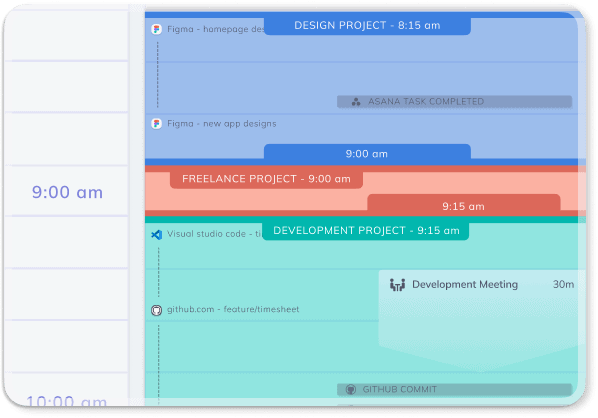
In a world where digital distractions are everywhere, it’s often difficult to understand exactly where our time goes.
How does RescueTime work?
Learn how to use the RescueTime app to take back control by providing a detailed analysis of your productivity and daily habits.
How RescueTime Works: 8 Key Features
1️⃣ Automatic Time Tracking Without Manual Input
The main feature of RescueTime is its automatic time tracking.
Unlike other apps requiring manual input, RescueTime automatically logs the time spent on apps, websites, and even specific documents.
No timers or constant reminders are needed — everything runs in the background, allowing you to focus on your tasks.
The generated reports provide a clear view of your activity, helping you identify productivity blockers and overcome them more effectively.
2️⃣ Detailed Reports and Personalized Goals
With RescueTime, you get comprehensive reports highlighting trends in your time usage.
These reports make it easy to identify time-wasting activities and set specific goals to improve productivity.
For instance, you can decide to spend less time on social media and more on creative or professional projects.
Real-time alerts help you stay focused on your goals by notifying you when you exceed certain limits, allowing you to adjust your priorities accordingly.
3️⃣ Offline Time Tracking
RescueTime is not limited to tracking online activities.
It also accounts for offline time, such as meetings, calls, or other non-screen activities.
You can easily log these offline periods to get a complete overview of your day and better understand how you allocate your time.
4️⃣ Focus Sessions to Avoid Distractions
To combat distractions, RescueTime offers “focus sessions” that block access to the most distracting websites and apps.
These focus periods help you stay on track with important tasks, eliminating distractions and boosting your efficiency.
If you’d like to learn more about apps to block distractions for a set period, RescueTime is an excellent choice.
5️⃣ Integration with Other Apps
RescueTime integrates with many apps to streamline your day.
For example, you can sync your tasks with Asana, automatically update your Slack status, or track activities via your calendar.
These integrations simplify task management and enable effortless activity tracking, helping you maximize organization and productivity.
6️⃣ Timesheets AI for Project Management
For professionals, RescueTime offers Timesheets AI, a tool that creates timesheets quickly and accurately.
RescueTime’s AI automatically allocates your time across projects or clients, making project tracking simple and efficient.
This tool is particularly useful for billable projects, reducing errors and saving valuable time during invoicing.
7️⃣ RescueTime for Teams
RescueTime isn’t just for individuals; it’s also designed for teams.
With features dedicated to project management and group timesheets, RescueTime helps teams stay organized, meet deadlines, and maximize collective productivity.
Its intuitive interface makes managing workflows smoother and more efficient for the entire team.
8️⃣ An Assistant for Better Time Management
Ultimately, RescueTime is more than just a time-tracking tool.
It’s a true assistant that helps you understand and improve your work habits, avoid distractions, and achieve personal and professional goals.
Whether you’re a freelancer looking to better manage your time or a team aiming to optimize workflows, RescueTime is a complete and effective solution to take control of your time and enhance productivity.
To learn more about the cost of RescueTime and the free version, check out this article explaining if RescueTime is still free.
Try RescueTime Today
Don’t let distractions steal your precious time anymore.
Try RescueTime today and transform your work habits to boost productivity and achieve your goals.
Start your free trial now and take back control of your time!
If you are interested in the topic of productivity, I invite you to discover all my articles on productivity.
If you are looking for tools to improve your time management skills, I recommend you read my article on the best time management apps.
If you want to take advantage of the expertise of a time management coach, write to us now using our contact form or call us by phone or on WhatsApp at +33 6 69 46 03 79.
Are you ready to take action?
Here are the rates for our coaching packages for individual clients:
- one month coaching package
- 3-month coaching package
- 6-month coaching package
- 1-year coaching package
FAQ – How Does RescueTime Work?
How does RescueTime work?
RescueTime works by automatically tracking the time you spend on apps, websites and digital activities. It runs in the background and creates reports that help you understand how you use your time during the day.
Does RescueTime track time automatically?
Yes, RescueTime tracks time automatically without requiring manual input. You do not need to start or stop timers. The app records your activity in the background so you can focus on your work.
What kind of reports does RescueTime provide?
RescueTime provides reports that show how your time is distributed across websites, apps and activities. These reports help you identify distractions, understand your work habits and make better decisions about your productivity.
Can RescueTime help me set productivity goals?
Yes, RescueTime allows you to set personalized productivity goals. For example, you can decide to reduce time spent on distracting websites or increase time dedicated to focused work, creative projects or professional tasks.
Does RescueTime track offline time?
Yes, RescueTime can also account for offline time, such as meetings, phone calls or other non-screen activities. This gives you a more complete overview of how your day is organized.
What are RescueTime focus sessions?
Focus sessions are periods during which RescueTime helps you avoid distractions by blocking access to distracting websites and apps. They are useful when you need to concentrate on important tasks.
Does RescueTime integrate with other apps?
Yes, RescueTime can integrate with other tools such as task management apps, calendars or communication platforms. These integrations can help you streamline your workflow and manage your activities more efficiently.
What is Timesheets AI in RescueTime?
Timesheets AI is a feature designed to help professionals create accurate timesheets. It can allocate time across projects or clients, which is especially useful for billable work, project tracking and invoicing.
Can teams use RescueTime?
Yes, RescueTime can also be used by teams. It helps teams track work, manage project time, create timesheets and improve collective productivity through better visibility of how time is spent.
Who should use RescueTime?
RescueTime can be useful for freelancers, professionals, entrepreneurs and teams who want to understand their work habits, reduce distractions, improve focus and take better control of their time.
Read this article in other languages
Français : Comment fonctionne RescueTime ?
Italiano: Come funziona RescueTime?